


norman strothman
 Sep 23, 2013 | 12:42 AM
#1

Thread Starter
|
Weekend Warrior
Joined: Jul 2013
Posts: 10
Likes: 0
 norman strothman
hi i,m new to the world of playing in the mud with my new 2013 polaris sportsman 400 ho 4x4. first time on a atv and loving it. never knew this could be so much fun at my age of 60 but i love mudding with my atv. how do i add photos?
Sep 23, 2013 | 07:42 AM
#2

Supersock
Hired Gun!
"Badges? We don't need no stinkin' badges!"
Hired Gun!
"Badges? We don't need no stinkin' badges!"


Joined: Apr 2003
Posts: 142,525
Likes: 182
From: Land of the misfit toys
Welcome to the forums. 
There are two ways you can do that. One you won't be able to do until you get 20 posts. With that, you just copy the hyperlink address of the photo you want to post from a host site like flickr or photobucket. Then come back in here and click on the icon just above the reply box. Put in the link you copied and it will appear in your reply. You have to watch how big the picture is. Sometimes they come out just way too large to post that way.
The other way is to use the Manage attachments option in your reply area. Finder the User CP tab in the upper left part of the screen. Click on that. on the left side of the page, look for Settings and Options, then click on the Edit Options link. Go to the bottom of the page, and in the Miscellaneous Options, the first one is Message Editor Interface. Set that to Enhanced Interface. Now when you are posting a reply, you should be able to scroll down below the reply box a see Additional Options. Click on Manage Attachments and you can upload pics directly from your computer.
The first option looks like this:
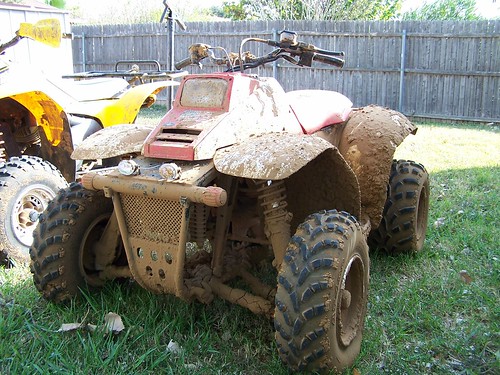
The Second one will appear as the smaller box below the post.
There are two ways you can do that. One you won't be able to do until you get 20 posts. With that, you just copy the hyperlink address of the photo you want to post from a host site like flickr or photobucket. Then come back in here and click on the
icon just above the reply box. Put in the link you copied and it will appear in your reply. You have to watch how big the picture is. Sometimes they come out just way too large to post that way. The other way is to use the Manage attachments option in your reply area. Finder the User CP tab in the upper left part of the screen. Click on that. on the left side of the page, look for Settings and Options, then click on the Edit Options link. Go to the bottom of the page, and in the Miscellaneous Options, the first one is Message Editor Interface. Set that to Enhanced Interface. Now when you are posting a reply, you should be able to scroll down below the reply box a see Additional Options. Click on Manage Attachments and you can upload pics directly from your computer.
The first option looks like this:
The Second one will appear as the smaller box below the post.



Thread
Thread Starter
Forum
Replies
Last Post
Drag-n-fly
Classifieds, Garage Sale & Swap Shop
1
Feb 23, 2012 01:00 PM
Currently Active Users Viewing This Thread: 1 (0 members and 1 guests)